
Chapter 10
Quarter
The Quarter dashboard is your Personal Retreat brought to life: this quarter's goals with live progress, your Wheel of Life, values, and ideal week. It reads the files described in How ObsiFocus Works › The quarter (Personal Retreat).
The header
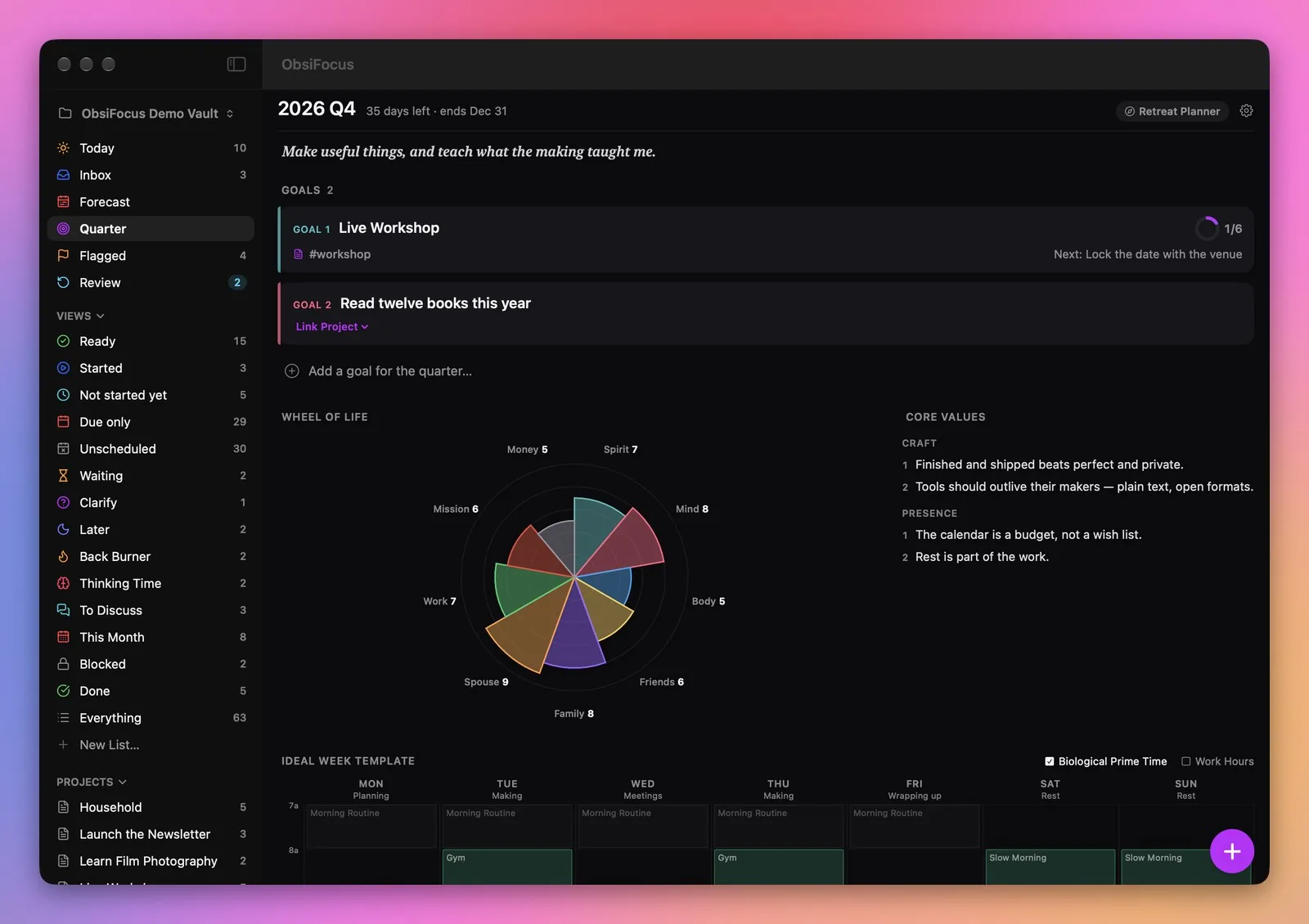
The quarter's name and N days left · ends …, plus Retreat Planner (opens retreat.practicalpkm.com) and Open in Obsidian.
If this quarter's retreat note doesn't exist yet, you'll see Create 2026 Q4 (or whichever quarter), which makes it from your retreat template.
From the Retreat Planner
At the end of a retreat in the Retreat Planner, choose Send to ObsiFocus. ObsiFocus opens (on the Mac or iPhone you're using) and asks:
- Which quarter the retreat plans. A retreat held in a quarter's last three weeks suggests the next quarter; otherwise it's the current one.
- Also update My Ideal Week: whether the week you planned replaces your ideal week note. It's on when you don't have that note yet, and off when you do (perhaps laid out your own way).
Save writes the quarter's note (Replace if one is already there). Any note it replaces is backed up first, like every other edit. Then the Quarter page opens.
The retreat travels in the link itself; nothing passes through a server.
Sections
- LifeTheme — your one-line statement.
- Goals — one card per
### Goal N:heading in the note's Planning section.- A goal linked to a project shows its progress ring and Next: — the next available task (or nothing open / nothing available). Tap it to open the project.
- An unlinked goal has a Link Project menu.
- Right-click a goal: Edit Goal… or Unlink Project.
- Add a goal for the quarter… adds a new goal heading.
- Wheel of Life — drawn from the scores in the note's frontmatter.
- Core Values.
- Ideal Week — your week as a grid.
- Toggle Biological Prime Time and Work Hours shading.
- Click a day's theme… to set it.
- Click a block's color swatch to recolor that activity everywhere (or set it back to Automatic).
- Revise in Obsidian opens the note to edit the blocks themselves.
Everything you change here is written back into those same notes.
Settings
Settings → Quarter sets which day the week starts, your prime-time window, working days and hours, and where the retreat folder, template, ideal week, LifeTheme and core values notes live.